Get your Anthropic API key
Get your Claude API key for Opus, Sonnet, and Haiku models
Anthropic's API keys (managed through Claude Platform) give you access to Claude models. You need a Claude Platform developer account — separate from a Claude.ai subscription.
sk-ant-api03-Minimum $5. New accounts get $5 in free trial credits (expires 14 days after claiming).
Available models on Mykey
Step-by-step guide
Create a Claude Platform Account
Sign up at platform.claude.com.
- Go to https://platform.claude.com
- Choose "Continue with Google" or "Continue with email"
- For email sign-up: enter your email and create a password
- Verify your email via the confirmation link
- Complete phone verification (SMS code)
New accounts get $5 in free trial credits — look for the banner and click "Claim" to activate. Free credits expire 14 days after claiming.

Navigate to API Keys
Find the API Keys section in settings.
- From the left sidebar, click Settings → API Keys
- Direct URL: https://platform.claude.com/settings/keys
- You'll see a list of any existing keys with their status and usage

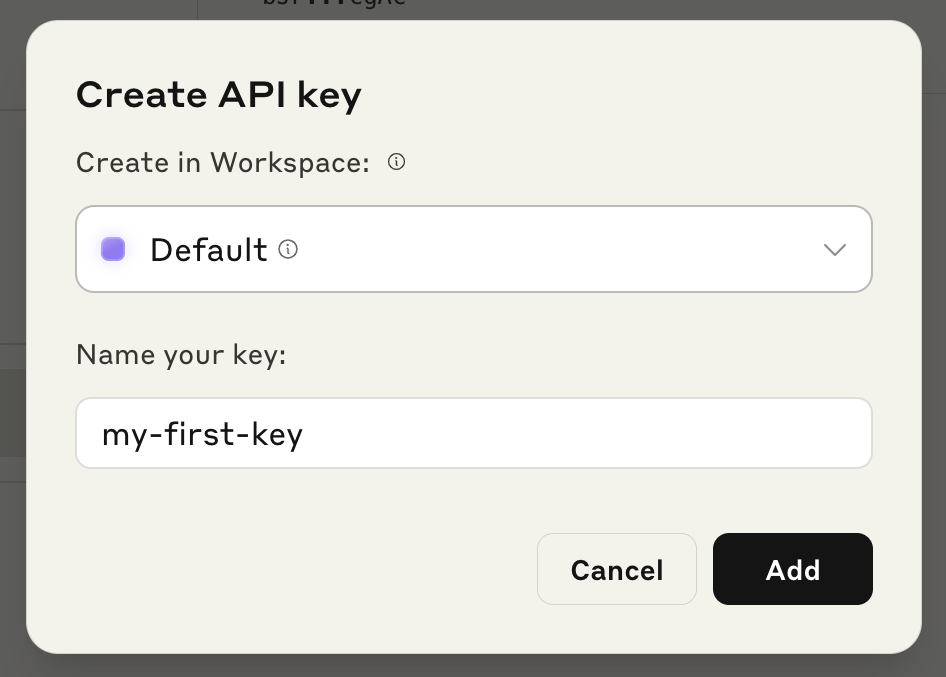
Create a New API Key
Generate your key with a name and workspace.
- Click "+ Create Key" (top-right)
- Enter a descriptive name (e.g., "Mykey Chat")
- Select a Workspace (use "Default" if you're just starting)
- Click "Create API Key"
Copy and Save Your Key
Your key is shown only once.
- Copy the key immediately — it's shown only once
- Format: sk-ant-api03-xxxxxxxxxxxxxxxxxxxxxxxxxxxx... (~108 characters)
- Store securely in a password manager
If you lose the key, you must revoke it and create a new one. There is no way to reveal it again.
Add Credits (Required)
Purchase credits before using the API.
- Go to Billing in the left sidebar
- Click "Buy Credits"
- Purchase at least $5 (the minimum)
Your key won't work until credits are added.
Add Your Key to Mykey.chat
Connect your key in Mykey settings.
- In Mykey.chat, go to Settings → API Keys
- Select Anthropic as the provider
- Paste your API key
- Click Save
Common issues
| Issue | Fix |
|---|---|
| Credit balance too low | You must purchase credits — even free credits need to be claimed |
| Key not working | Ensure no leading/trailing whitespace; keys are case-sensitive |
| Workspace not found | Check you're in the correct workspace for this key |
| Key revoked | Go to API Keys page, check status, create a new key if needed |
Frequently asked questions
Do I need a Claude Pro subscription?
No. API access is completely separate from Claude Pro subscriptions. You need an API key from the Claude Platform, which uses prepaid credits.
What happened to console.anthropic.com?
The old console.anthropic.com now redirects to platform.claude.com. All API key management is done at the new URL.
Ready to connect your Anthropic key?
Sign in to Mykey and paste your API key in Settings. It will be encrypted with AES-256 immediately.
Sign in to Mykey